






Noots captures
the meeting.
The bot joins the call and keeps every word. What was decided becomes tasks on the board, with owners and dates, before anyone has typed a note.
Joins Zoom, Google Meet and Microsoft Teams
Joins the calls you already run. Imports the boards you already have.
Everything your team needs. Connected.
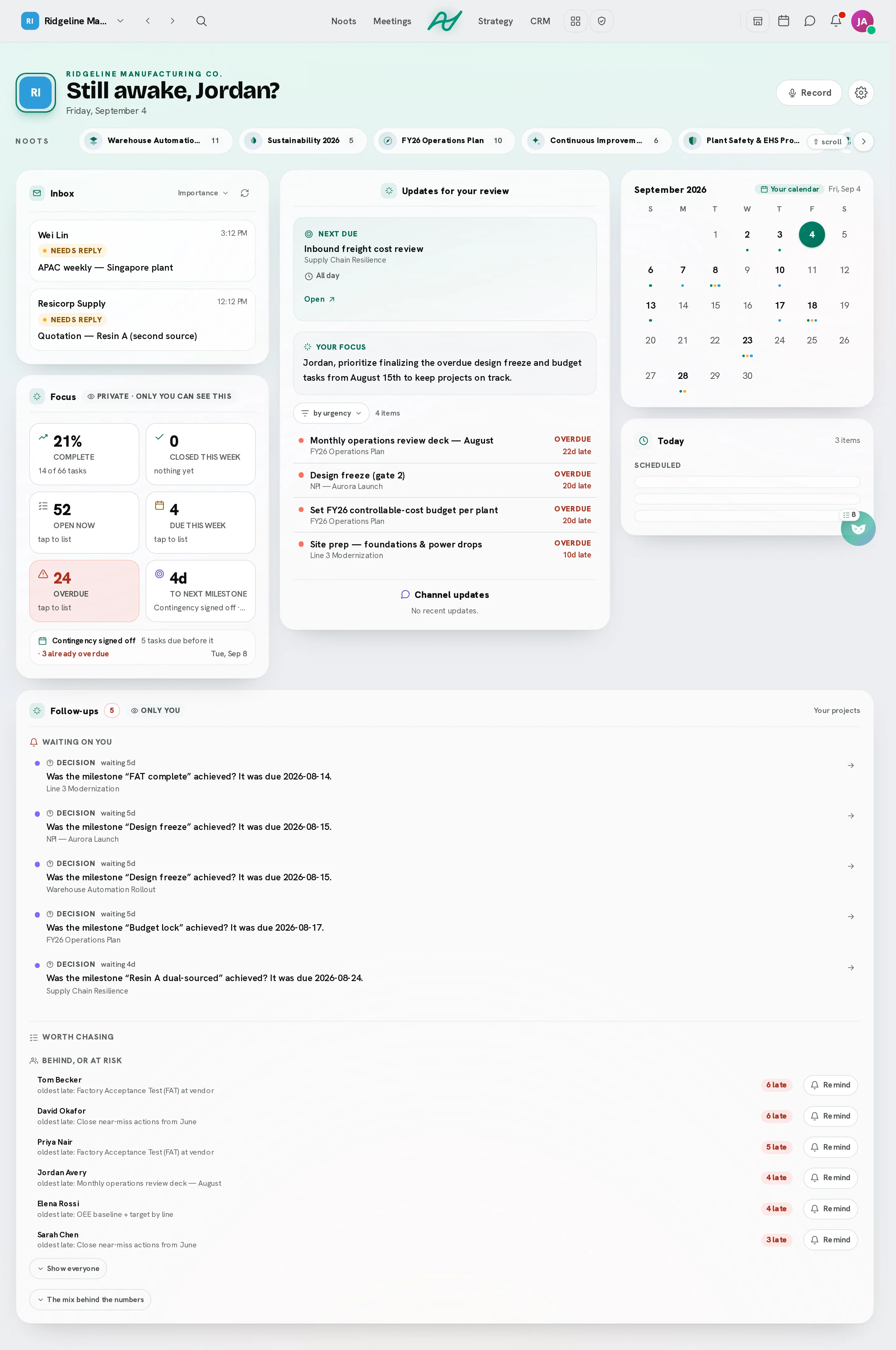
A project workspace where the meetings, the boards, the chat, the calendar, the documents and the customers live in one place, with an AI that has read all of it. Each tile is a door into the product.
Your team shouldn't need seven apps to finish one project.
Every tool holds one slice of the project: the decision in a recording, the task on a board, the date in a calendar, the customer in a fourth window. A person carries the changes between them by hand, and the day goes on the carrying.
- Status typed three timesIn the channel, on the board, in the weekly update. Three versions, none of them current.
- Decisions lost between toolsWhat was agreed in the call never reaches the card it was about.
- Deadlines nobody movedThe date slipped in the meeting. The plan still says Thursday.
- Every question is a tab switchSeven windows to answer one question: which of them has the latest?
Site survey
ThuSite survey
Fri?Site survey
done?Site survey
Thu 10:00Site survey
FriSite survey
AwaitingSite survey
Re: re: survey| Without Noots | With Noots |
|---|---|
| The decision is in the recording. The task it created is somewhere else. | The meeting writes the card, and the card links back to the minute it came from. |
| Status typed three times: the channel, the board, the weekly update. | One card. The channel, the timeline and Hoot all read the same one. |
| The date slipped in the call. The plan still says Thursday. | The new date is proposed on the board and moves when you say yes. |
| Finding a time means four calendars and three timezones. | One find-a-time across everyone's own hours, leave included. |
| The customer's deal is in one tool and their project in another. | Contacts and deals sit beside the boards they are about. |
| Every question is a tab switch: which tool has the latest? | Ask Hoot. It reads all of it and shows where the answer came from. |
| Seven logins, seven bills, seven admin consoles. | One workspace, one bill, one set of roles. |
In Noots the pieces read each other, so a change made in one place is the change everywhere else.
Three jobs off your desk.
The work between the tools - typing up the call, chasing the plan, finding a time - is the work Noots takes.
The call becomes the board.
Send the bot into the call, or capture from your browser. The tasks, dates and owners land on the right board, reconciled against what is already there - run the same meeting twice and nothing duplicates.
We can't start the fit-out until the switch order lands.
I'll chase the supplier today and confirm the date.
Then the survey slips a week. Let's re-plan around it.
Fit-out waits on the switch order
Chase the supplier - Jo, today
Site survey slips one week
An AI project manager, on a leash you set.
Two dials: how much it may do without asking, and how far ahead it is answerable for. It plans from a brief, assigns from real capacity, re-dates what slipped and tells the owners - and every change it makes can be undone one at a time.
Site survey → Mia (68% loaded, lightest of three)
Undo“about 3 days behind” → moved 4 tasks
UndoSwitch order blocked → raised to the team lead
UndoFit-out crew has no lead - suggest Ravi
Needs you11 tasks due past the milestone were left alone. Every change above is individually reversible.
Chat and a calendar that respect the team.
Every project gets a channel. Everyone keeps their own timezone and working hours, and the scheduler respects both - and leave.
Jo Supplier confirmed - switches land Tuesday.
Alex /summarize
Send now, or schedule for their morning?
14:00 UTC works for all three. Mia is on approved leave Friday.
One AI across all your tools.
Hoot reads every tool in the workspace - boards, meetings, notes and files, calendar, budget, CRM and Grids - under your own permissions, and answers with the receipts.
- What's delaying this project?
- What did we decide yesterday?
- Which tasks are overdue?
- Are we over budget?
- What does everyone have planned this week?
Hoot finds the answer and shows where it came from.
It cites its sources.
Every answer carries chips that link back to the task, meeting or budget line it was computed from.
It reports beside you.
Hoot sits in a side panel on every page of the app and raises what needs a look - overdue work, a decision waiting, a budget running hot - before you ask.
It draws the answer.
41 chart types, plus dashboards and infographics, drawn from your live data under your own permissions.
An example: someone asks Hoot what is delaying the project. Hoot answers that the switch order is blocked and the site survey moved a week, links the board, the meeting and the timeline it read, and draws the project's tasks by status.
Three things a stack of apps cannot give you.
The whole organisation on one board, dates kept by the same system that heard them agreed, and a workspace shaped to you with the controls to match.
The whole organisation, on one board
Sub-organisations under one parent, teams inside them, and 6 roles from owner to viewer, enforced on the server. A private project stays private in the query itself; everyone else sees the same board, the same channel, the same calendar, so the status meeting becomes a look rather than a call.
- ALAlex G.Owner
- JOJo P.Manager
- MIMia T.Member
- RARavi K.Viewer
Time, kept by the system that heard it agreed
Your Google or Microsoft calendar syncs both ways and the bot joins on its own. A date agreed in a call is proposed on the board and moves when you say yes; a milestone that passes asks whether it was reached and offers the push. Reminders fire on their own, and Autopilot does the weekly project-manager round: re-dating what slipped, chasing owners, keeping the follow-ups.
Tue
Wed
Thu
Fri
Review
10:00
Bot joinsFit-out
Fit-out
MovedChase
The fit-out milestone moved Thursday to Friday once you said yes; nothing moved on its own.
Autopilot · Mon 08:00 re-dated 4, chased 2, left 11 alone
Shaped to you, with the controls to match
Pick your industry and the projects, tabs and tools arrive set up for it; add your own tabs and extensions and define your own roles. And the security is the real kind: two-factor you can require of everyone, roles enforced in SQL, an audit log, your own AI endpoint, data permissions you can switch off one by one, and a retention policy that deletes on schedule.
Workspace
Industry
Tabs on every project
Extensions
69 in the catalogue, switched on per workspace
Roles
Security
- Require two-factor of everyonerefused at the request
- Audit logevery administrative action
- Private AI endpointyour own model, no silent fallback
- Data retentiontranscripts deleted on schedule
Data permissions, each its own switch
- Product improvement
- Personalisation
- Partner sharing
What one workspace buys back, a month.
For a team of 10, every month. An estimate with its inputs beside it: your numbers will differ.
The inputs
- Time
- 10 meetings a week × 15 minutes to write each one up and chase what was agreed = 2.5 hours a week × 52 ÷ 12 = 10.8 hours a month.
- Money
- The usual stack (monday.com Pro $19 + Fireflies.ai Business $19 + Slack Business+ $15 + Calendly Teams $16) = $69 a seat a month, less Noots Business $18 = $51 a seat × 10 seats = $510 a month.
- Vendor list prices, per seat, billed annually, read 28 August 2026. Noots prices from our own plans. Seat blocks and minimums make a small team's real stack dearer.
Built around how your team actually works.
Pick what you do when you create the workspace. The projects, the tabs on every board and the tools that come switched on are different for a service desk than for a site office.
The paperwork lives here too.
Getting a document signed, keeping the chart of who does what, and the training people have to do and be able to show. Each one is an area of its own, switched on at setup for the trades that live on it and one click away in every other workspace.
- ALAlex G.Signed
- JOJo P.Signed
- MIMia T.Waiting
Upload a PDF or send a file from a project, a task or a conversation, place the signature and text fields on the page, and send it to the people who have to sign it, one at a time in an order you set or all at once. Every signature leaves the same record: who signed, the moment they did, and how they were identified - the account they were signed in as, or a code sent to their inbox.
- The file is fingerprinted when it goes out and again as each person signs, and every screen that shows a signature checks the bytes before it says anything.
- Somebody outside your workspace confirms a code sent to their inbox before they see the document, and one sealed PDF with a certificate of completion arrives when the last person signs.
Before anything moves
- Create the division Quality
- Move Ravi K. to the Inspection team
- Make Mia T. the lead of Inspection
Draw the company as it actually runs - divisions, teams, the people in them and who leads - then publish it so anybody who needs the chart can open it. When the drawing and the real workspace disagree, correct the workspace from the drawing.
- Every change is listed before one person moves, and it refuses outright to touch a team that belongs to a project or to leave the workspace with nobody who can run it.
- Drawing and publishing are on every plan. Pushing a drawing into the real teams is on the Business plan and up.
Quiz
- Who signs the permit?Correct
- When does it lapse?Correct
- Describe the muster pointFor a person to read
Write the guide, add a quiz, and give it to one person, a team, a division or the whole workspace with a date on it. Reminders arrive on that person's own clock, and the record of who is current, who is late and whose certificate is about to lapse is a filter rather than a fortnight.
- A quiz is marked for you, and a written answer it does not recognise is held for a person to read rather than marked wrong.
- Ready-made modules come with it, on how this product's own tools work and on the practice behind the job. Use one as it is, or copy it and make it yours.
Encrypted, permissioned, and audited.
Every control below is built and running today. The security page adds the rest: every company that receives any of your content, every permission we ask of Google, Microsoft and Zoom, what happens to your data when you leave - and the attestations we do not hold.
Encrypted in transit, and credentials sealed at rest
TLS on every connection, and every third-party credential we hold is stored under an AES-256-GCM envelope.
SSO, SCIM, and two-factor you can require
Bring your own identity provider, sync joiners and leavers, and require a second factor of everyone - refused at the request, not at the page.
Role-based access, enforced in SQL
Private projects are filtered in the query, not hidden in the interface.
Audit log and IP allowlisting
Every administrative action is recorded; access can be pinned to your network.
Per seat, per month, billed annually. Every new workspace starts its trial on the Business tier and keeps a free plan afterwards.
Unlimited people · AI Autopilot · Your own AI endpoint
Quoted for you, a dedicated customer success manager, a workspace tailored to how you run.
See what Noots can do with your team.
No credit card required · 14 days of full access · Free plan available afterwards.